
验证码效果如图: 验证码调用地址: Application\Home\Controller\CodeController.class.php Vendor(Vcode.Vcode, , .class.php); $config = array(width = 100, height = 36, count = 4, str = 2); //配置 $vcode = new \Vcode($config);

验证码效果如图:
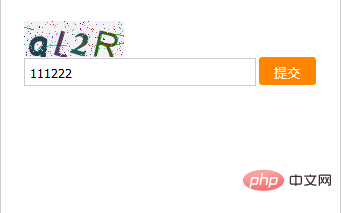
验证码调用地址:Application\Home\Controller\CodeController.class.php
Vendor('Vcode.Vcode', '', '.class.php');
$config = array("width" => 100, "height" => 36, "count" => 4, "str" => 2); //配置
$vcode = new \Vcode($config);
$vcode->getCode(); //获取验证码
$vcode->getImg(); //输出图片
exit;
(相关免费学习视频教程分享:php视频教程)
验证码图片如下:
<img src="__APP__/code/" id="code" onclick="changeCode($('#code'))"/>JS通过后缀加随机数Math.random()来刷新验证码
function changeCode(obj) {
 obj.attr("src", '__APP__/code/?' + Math.random());
}
检测验证码是否输入正确
<input type="text" id="input_code" class="input"/>
<input type="button" value="提交" class="btn" onclick="checkCode()"/>
function checkCode() {
  $.post("__APP__/Code/check", {code: $("#input_code").val()}, function(data) {
    if (data == '1') {
      alert("验证码正确!");
    } else {
      alert("验证码错误!");
    }
  }, "json")
}
PHP验证传过来的参数code和当前session存储的验证码进行比较,若是正确返回1,错误则-1
public function check() {
    $code = I('post.code');
    if (strtolower($code) == $_SESSION["sucaihuo_code"]) {
      echo "1";
    } else {
      echo "-1";
    }
}
相关文章教程推荐:php教程
以上就是php实现字母数字混合验证码的详细内容,更多请关注自由互联其它相关文章!