
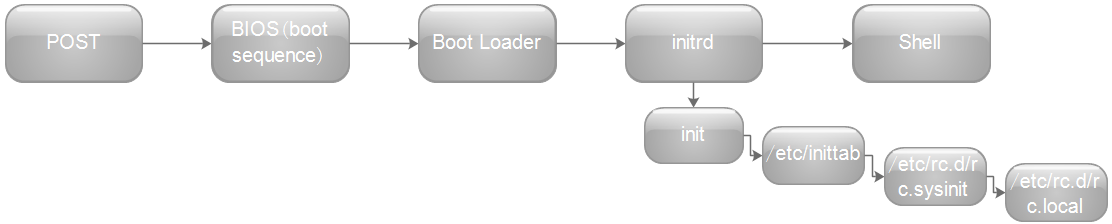
简单介绍下各阶段工作流程:
POST:开机后,加载BIOS信息(里面包含各硬件的相关信息)
BIOS(boot sequence):选择(设备)启动项,然后读取MBR信息
Boot Loader:初始化硬件、建立内存空间映射,读取grub配置文件
Initrd:加载内核(硬件检测及初始化、挂载根文件系统)0→启动第一个进程init→该程序读出/etc/inittab、/etc/rc.d/rc.sysinit、/etc/rc.d/rc.local文件
Shell:启动/bin/login程序,进入登录界面
进入实验部分:
一、环境搭建
1、虚拟机(server1)上添加一个硬盘
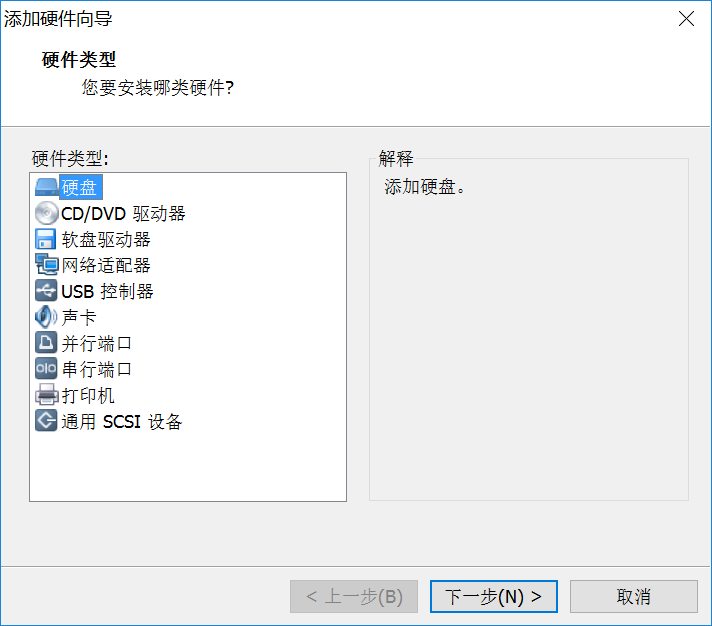
2、在系统中给该磁盘进行分区
[root@localhost ~]# fdisk /dev/sdb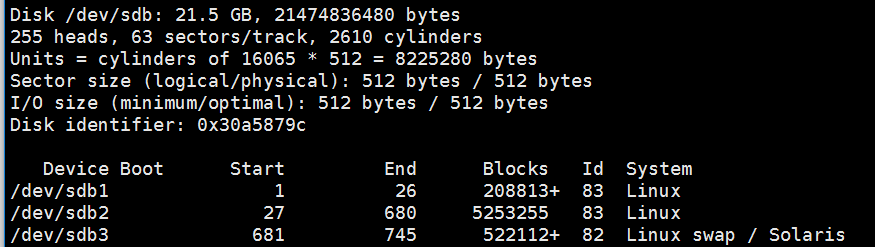
3、格式化
[root@localhost ~]# mke2fs -t ext4 /dev/sdb1 [root@localhost ~]# mke2fs -t ext4 /dev/sdb2 [root@localhost ~]# mkswap /dev/sdb34、挂载
5、安装grub
[root@localhost ~]# grub-install --root-directory=/mnt /dev/sdb6、创建linux各目录
[root@localhost ~]# cd /mnt/sysroot/ [root@localhost ~]# mkdir -pv etc/rc.d var/log root proc sys srv boot mnt tmp home dev lib lib64二、编译内核
[root@localhost ~]# tar xf linux-3.13.6.tar.xz -C /usr/src/ #解压 [root@localhost ~]# cd /usr/src/ [root@localhost src]# ln -s linux-3.13.6 linux #创建软链接 [root@localhost src]# cd linux [root@localhost linux]# yum groupinstall "Development Tools" -y #安装开发包组 [root@localhost linux]# make allnoconfig #重置配置选项 [root@localhost linux]# make menuconfig如果make menuconfig时报错:
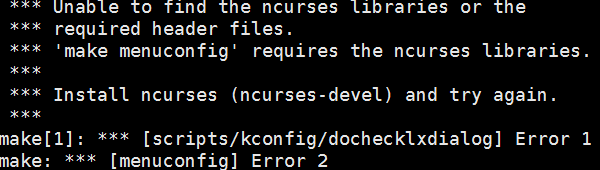
提示:缺少ncurses-devel库文件
[root@localhost linux]# yum -y install ncurses-devel [root@localhost linux]# make menuconfig #再次进行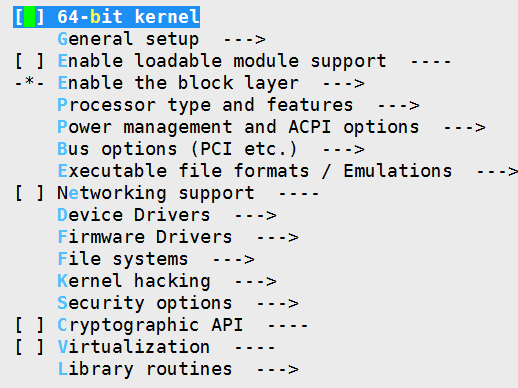
[root@localhost linux]# make bzImage -j 3 #只编译内核,并且使用3个线程 [root@localhost linux]# cp arch/x86_64/boot/bzImage /mnt/boot/ #拷贝内核
三、安装busybox
安装busybox需要依赖glibc-static
安装glibc-static 包在DVD2中,如何没有DVD2比如我..,自己搭建网络yum源安装
root@localhost ~]# wget http://mirrors.163.com/.help/CentOS6-Base-163.repo 这是网易yum源的配置文件 [root@localhost ~]# yum clean all /#生效刚刚加载的yum仓库 [root@localhost ~]# yum -y install glibc-static [root@localhost ~]# tar xf busybox-1.22.1.tar.bz2 [root@localhost ~]# cd busybox-1.22.1 [root@localhost busybox-1.22.1]# make menuconfig-> Busybox Settings -> Build Options [*] Build BusyBox as a static binary (no shared libs)[root@localhost busybox-1.22.1]# make && make install [root@localhost busybox-1.22.1]# cp -a _install/* /mnt/sysroot/
提供grub.conf文件:
[root@localhost ~]# vim /mnt/boot/grub/grub.conf default=0 timeout=5 title Linux (3.13.6) root (hd0,0) kernel /bzImage ro root=/dev/sda2 init=/sbin/init [root@localhost ~]# sync #把内存缓冲区的数据立即写入磁盘中测试:
添加新的虚拟机(server2) 注意选择磁盘时要选择之前创建的磁盘
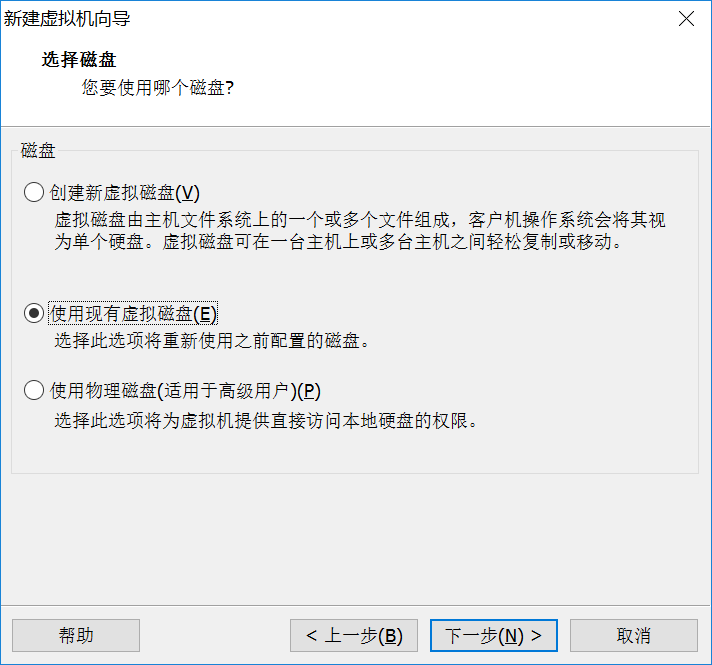
添加完成后,把server1挂起或关机,然后server2开机
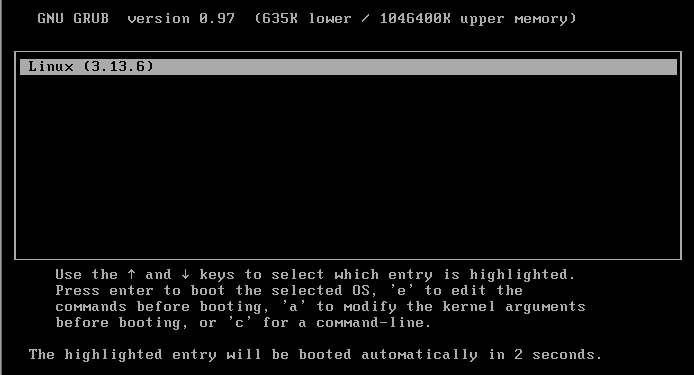
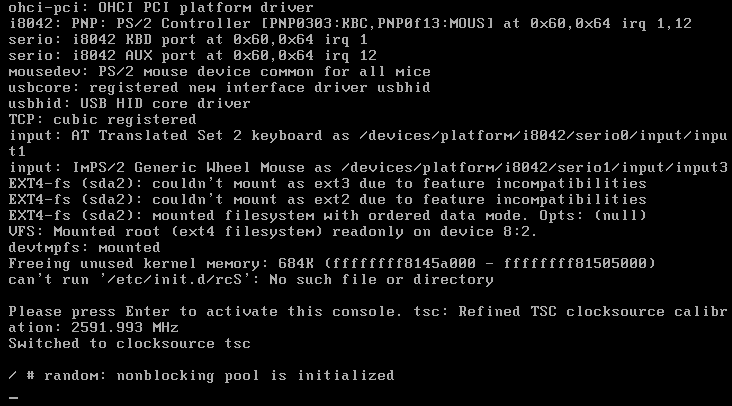
启动正常,但提示没有初始化文件
四、提供初始化文件(etc/fstab etc/inittab etc/rc.d/rc.sysinit)
[root@localhost sysroot]# vim etc/fstab /dev/sdb1 /boot ext4 defaults 0 0 /dev/sdb2 / ext4 defaults 0 0 /dev/sdb3 swap swap defaults 0 0 proc /proc proc defaults 0 0 sysfs /sys sysfs defaults 0 0提供账号和密码文件:
[root@localhost sysroot]# head -1 /etc/passwd > etc/passwd [root@localhost sysroot]# vim etc/passwd [root@localhost sysroot]# head -1 /etc/group > etc/group [root@localhost sysroot]# head -1 /etc/shadow > etc/shadow [root@localhost sysroot]# chmod 400 etc/shadow提供认证库文件:
[root@localhost ~]# cp -d /lib64/libnss_files* /mnt/sysroot/lib64/ [root@localhost ~]# cp -d /usr/lib64/libnss3.so /mnt/sysroot/usr/lib64/ [root@localhost ~]# mkdir /mnt/sysroot/usr/lib64 [root@localhost ~]# cp -d /usr/lib64/libnss3.so /mnt/sysroot/usr/lib64/ [root@localhost~]#cp -d /usr/lib64/libnss_files.so /mnt/sysroot/usr/lib64/ [root@localhost ~]# cp /etc/nsswitch.conf /mnt/sysroot/etc/ [root@localhost ~]# cp /etc/shells /mnt/sysroot/etc/提供主机名:
[root@localhost sysroot]# mkdir etc/sysconfig [root@localhost sysroot]# vim etc/sysconfig/network HOSTNAME=biao.com [root@localhost sysroot]# sync测试:
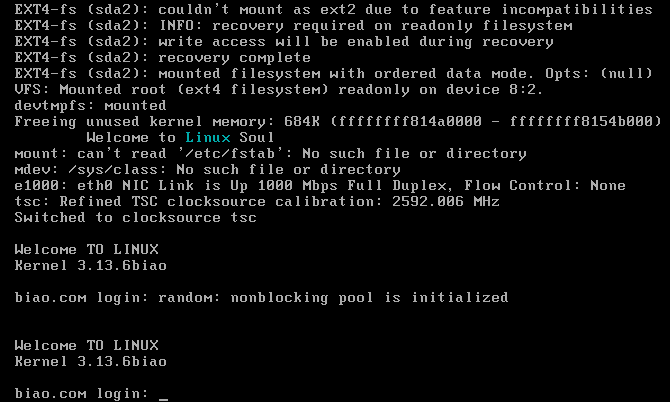
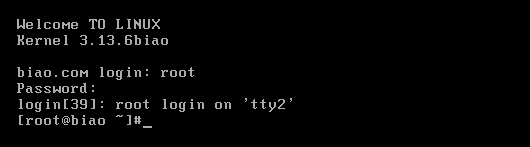
本地登陆成功!
五、提供ssh服务
[root@localhost ~]# tar xf dropbear-2016.73.tar.bz2 [root@localhost ~]# cd dropbear-2016.73 [root@localhost dropbear-2016.73]# ./configure预编译时如果报如下错误:

命令移植脚本:
#!/bin/bash aimDir=/mnt/sysroot cmdInput() { if which $cmd &> /dev/null;then cmdPath=`which --skip-alias $cmd` else echo "No such command." return 5 fi } cpCmd() { cmdDir=`dirname $cmdPath` [ -d ${aimDir}${cmdDir} ] || mkdir -p ${aimDir}${cmdDir} [ -f $cmdPath ] && cp $cmdPath ${aimDir}${cmdDir} } cpLib() { for libPath in `ldd $cmdPath | grep -o "/[^[:space:]]\{1,\}"`;do libDir=`dirname $libPath` [ -d ${aimDir}${libDir} ] || mkdir -p ${aimDir}${libDir} [ -f $libPath ] && cp $libPath ${aimDir}${libDir} done } echo "You can input [q|Q] quit." while true;do read -p "Enter a command: " cmd if [[ "$cmd" =~ \(|q|Q|\) ]];then echo "You choose quit." exit 0 fi cmdInput [ $? -eq 5 ] && continue cpCmd cpLib [ $? -eq 0 ] && echo -e "\033[36mCopy successful.\033[0m" Done移植所需的命令:
[root@localhost ~]# bash cp.sh You can input [q|Q] quit. Enter a command: dropbear Copy successful. Enter a command: dropbearkey Copy successful. Enter a command: q You choose quit.生成密钥:
[root@localhost ~]# mkdir /mnt/sysroot/etc/dropbear [root@localhost ~]# dropbearkey -t rsa -f /mnt/sysroot/etc/dropbear/dropbear_rsa_host_key -s 2048 [root@localhost ~]# dropbearkey -t dss -f /mnt/sysroot/etc/dropbear/dropbear_dss_host_key创建pid文件存放目录:
[root@localhost ~]# mkdir /mnt/sysroot/var/run挂载pts:
[root@localhost sysroot]# mkdir dev/pts [root@localhost sysroot]# vim etc/fstab ........ #上面省略 devpts /dev/pts devpts defaults 0 0提供服务脚本:
[root@localhost sysroot]# mkdir etc/rc.d/init.d [root@localhost sysroot]# vim etc/rc.d/init.d/dropbear #!/bin/bash # # description: dropbear ssh daemon # chkconfig: 2345 66 33 # dsskey=/etc/dropbear/dropbear_dss_host_key rsakey=/etc/dropbear/dropbear_rsa_host_key lockfile=/var/lock/subsys/dropbear pidfile=/var/run/dropbear.pid dropbear=/usr/local/sbin/dropbear dropbearkey=/usr/local/bin/dropbearkey [ -r /etc/rc.d/init.d/functions ] && . /etc/rc.d/init.d/functions [ -r /etc/sysconfig/dropbear ] && . /etc/sysconfig/dropbear keysize=1024 port=22 gendsskey() { [ -d /etc/dropbear ] || mkdir /etc/dropbear echo -n "Starting generate the dss key: " $dropbearkey -t dss -f $dsskey &> /dev/null RETVAL=$? if [ $RETVAL -eq 0 ]; then success echo return 0 else failure echo return 1 fi } genrsakey() { [ -d /etc/dropbear ] || mkdir /etc/dropbear echo -n "Starting generate the rsa key: " $dropbearkey -t rsa -s $keysize -f $rsakey &> /dev/null RETVAL=$? if [ $RETVAL -eq 0 ]; then success echo return 0 else failure echo return 1 fi } start() { [ -e $dsskey ] || gendsskey [ -e $rsakey ] || genrsakey if [ -e $lockfile ]; then echo -n "dropbear daemon is already running: " success echo exit 0 fi echo -n "Starting dropbear: " daemon --pidfile="$pidfile" $dropbear -p $port -d $dsskey -r $rsakey RETVAL=$? echo if [ $RETVAL -eq 0 ]; then touch $lockfile return 0 else rm -f $lockfile $pidfile return 1 fi } stop() { if [ ! -e $lockfile ]; then echo -n "dropbear service is stopped: " success echo exit 1 fi echo -n "Stopping dropbear daemon: " killproc dropbear RETVAL=$? echo if [ $RETVAL -eq 0 ]; then rm -f $lockfile $pidfile return 0 else return 1 fi } status() { if [ -e $lockfile ]; then echo "dropbear is running..." else echo "dropbear is stopped..." fi } usage() { echo "Usage: dropbear {start|stop|restart|status|gendsskey|genrsakey}" } case $1 in start) start ;; stop) stop ;; restart) stop start ;; status) status ;; gendsskey) gendsskey ;; genrsakey) genrsakey ;; *) usage ;; esac [root@localhost sysroot]# chmod +x etc/rc.d/init.d/dropbear [root@localhost sysroot]# cp /etc/rc.d/init.d/functions etc/rc.d/init.d/ [root@localhost sysroot]# cd etc/rc.d/ [root@localhost rc.d]# ln -s init.d/dropbear dropbear.start [root@localhost rc.d]# ln -s init.d/dropbear dropbear.stop [root@localhost rc.d]# echo "/etc/rc.d/*.start start" >> rc.sysinit
关机脚本
[root@localhost rc.d]# vim rc.sysdown #!/bin/sh # sync #把内存缓冲区的数据立即写入磁盘中 sleep 3 #给系统3秒的写入时间 /etc/rc.d/*.stop stop umount -a -r Poweroff [root@localhost rc.d] vim /mnt/sysroot/etc/inittab ::shutdown:/etc/rc.d/rc.sysdown #最后一行修改成这样
测试:
服务开机启动
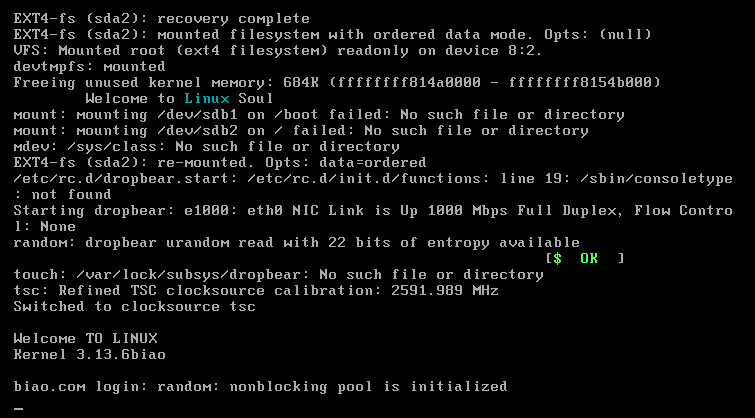
ssh远程登录成功:
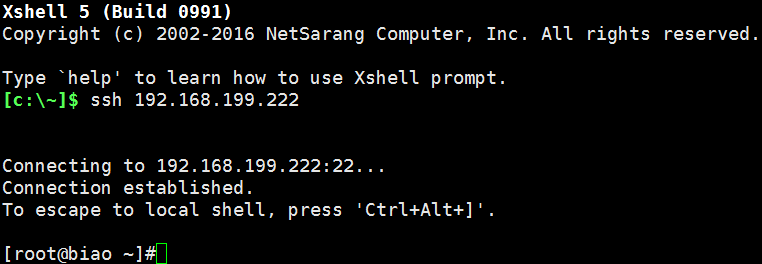
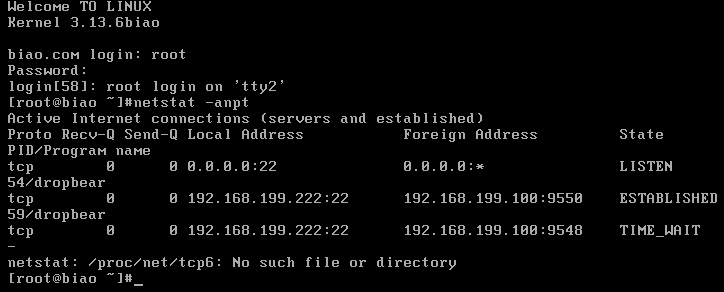
以上实验全部完成!!!!!!!!!