
1.创建子项目product-data-service https://blog.csdn.net/m0_45025658/article/details/106433731
2.pom.xml
SpringCloudorg.example0.0.1-SNAPSHOT4.0.0product-data-serverproduct-data-serverUTF-81.71.7org.springframework.cloudspring-cloud-starter-netflix-eureka-clientorg.springframework.bootspring-boot-starter-web
3.创建实体类
package org.example.pojo;public class Product {private int id;private String name;private int price;public int getId() {return id;}public void setId(int id) {this.id id;}public String getName() {return name;}public void setName(String name) {this.name name;}public int getPrice() {return price;}public void setPrice(int price) {this.price price;}public Product() {}public Product(int id, String name, int price) {super();this.id id;this.name name;this.price price;}}
4.新建服务类 下面这样做的目的是启动的服务来自哪个端口以便后序做集群的时候观察服务的来源
package org.example.service;import java.util.ArrayList;import java.util.List;import org.example.pojo.Product;import org.springframework.beans.factory.annotation.Value;import org.springframework.stereotype.Service;Servicepublic class ProductService {Value("${server.port}")String port;public List listProducts(){List ps new ArrayList();ps.add(new Product(1,"该服务端口为:"port, 50));ps.add(new Product(2,"该服务端口为:"port, 150));ps.add(new Product(3,"该服务端口为:"port, 250));return ps;}}
5.新建控制类 这样将服务注册到eureka的时候其他服务就可以访问到了。
package org.example.controller;import java.util.List;import org.example.pojo.Product;import org.example.service.ProductService;import org.springframework.beans.factory.annotation.Autowired;import org.springframework.web.bind.annotation.RequestMapping;import org.springframework.web.bind.annotation.RestController;RestControllerpublic class ProductController {AutowiredProductService productService;RequestMapping("/getProduct")public Object products() {List ps productService.listProducts();return ps;}}
6.新建application.yml
设置微服务的名称 product-data-service设置注册中心的地址 http://localhost:8761/eureka/ , 与 eureka-server 中的配置 application.yml 遥相呼应
spring:application:name: product-data-serviceeureka:client:serviceUrl:defaultZone: http://localhost:8761/eureka/#设置数据微服务的端口为8001 server:port: 8001
7.开启eurekaClient
package org.example;import org.springframework.boot.autoconfigure.SpringBootApplication;import org.springframework.boot.builder.SpringApplicationBuilder;import org.springframework.cloud.netflix.eureka.EnableEurekaClient;SpringBootApplicationEnableEurekaClientpublic class dataApplication {public static void main( String[] args ) {new SpringApplicationBuilder(dataApplication.class).run(args);}}
8.启动eureka和product-data-service
访问euraka http://127.0.0.1:8761/ 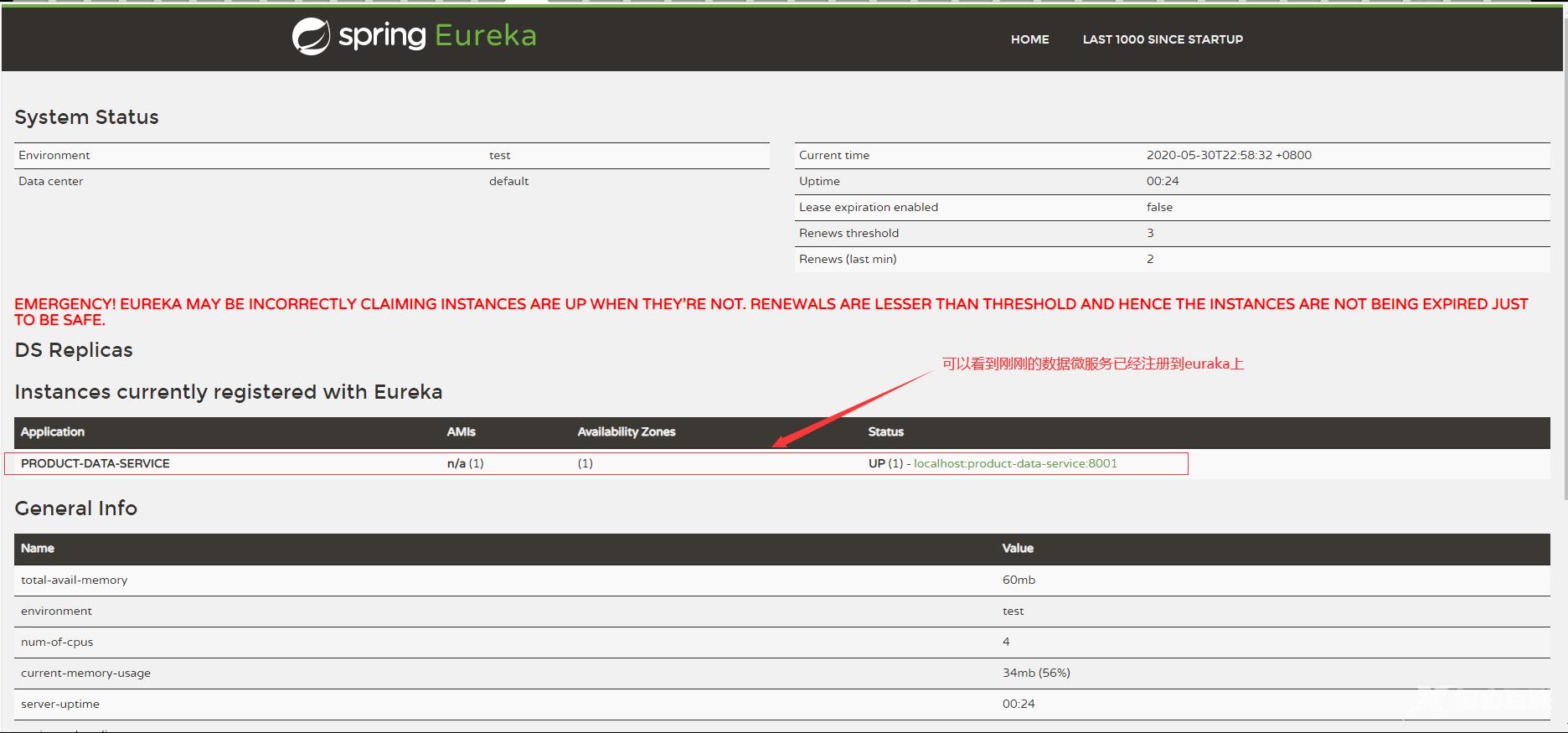 从上面可以看到数据微服务已经注册到eureka上下一步就是将已经注册的数据微服务从eureka上拿下来
本章详细信息请看https://how2j.cn/k/springcloud/springcloud-eureka-client/2039.html#nowhere