
1、工具/原料 html css 2、具体实现 效果图 html代码 body h1 style=color: redcss实现矩形边角加粗/h1 div class=main span/span span/span span/span span/span /div/body css代码 body{ display: flex; justify-content: center;
1、工具/原料
- html
- css
2、具体实现
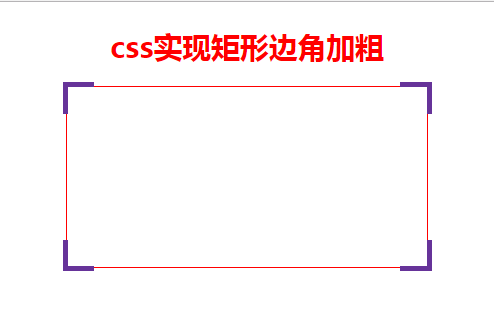
效果图
html代码
<body>
    <h1 style="color: red">css实现矩形边角加粗</h1>
    <div class="main">
        <span></span>
        <span></span>
        <span></span>
        <span></span>
    </div>
</body>
css代码
        body{
            display: flex;
            justify-content: center;
            flex-direction: column;
            align-items: center;
        }
        .main{
            position: relative;
            width: 400px;
            height: 200px;
            border: 1px solid red;
        }
        .main span:nth-child(1){
            position: absolute;
            left: -5px;
            top: -5px;
            padding: 15px;
            border-style: solid;
            border-color: rebeccapurple;
            border-width: 5px 0 0 5px;
        }
        .main span:nth-child(2){
            position: absolute;
            right: -5px;
            top: -5px;
            padding: 15px;
            border-style: solid;
            border-color: rebeccapurple;
            border-width: 5px 5px 0 0;
        }
        .main span:nth-child(3){
            position: absolute;
            right: -5px;
            bottom: -5px;
            padding: 15px;
            border-style: solid;
            border-color: rebeccapurple;
            border-width: 0 5px 5px 0;
        }
        .main span:nth-child(4){
            position: absolute;
            left: -5px;
            bottom: -5px;
            padding: 15px;
            border-style: solid;
            border-color: rebeccapurple;
            border-width: 0 0 5px 5px;
        }
原理很简单, 只要弄清position:relative,border和left,top之间的关系就可以了
以上就是本文的全部内容,希望对大家的学习有所帮助,也希望大家多多支持自由互联。